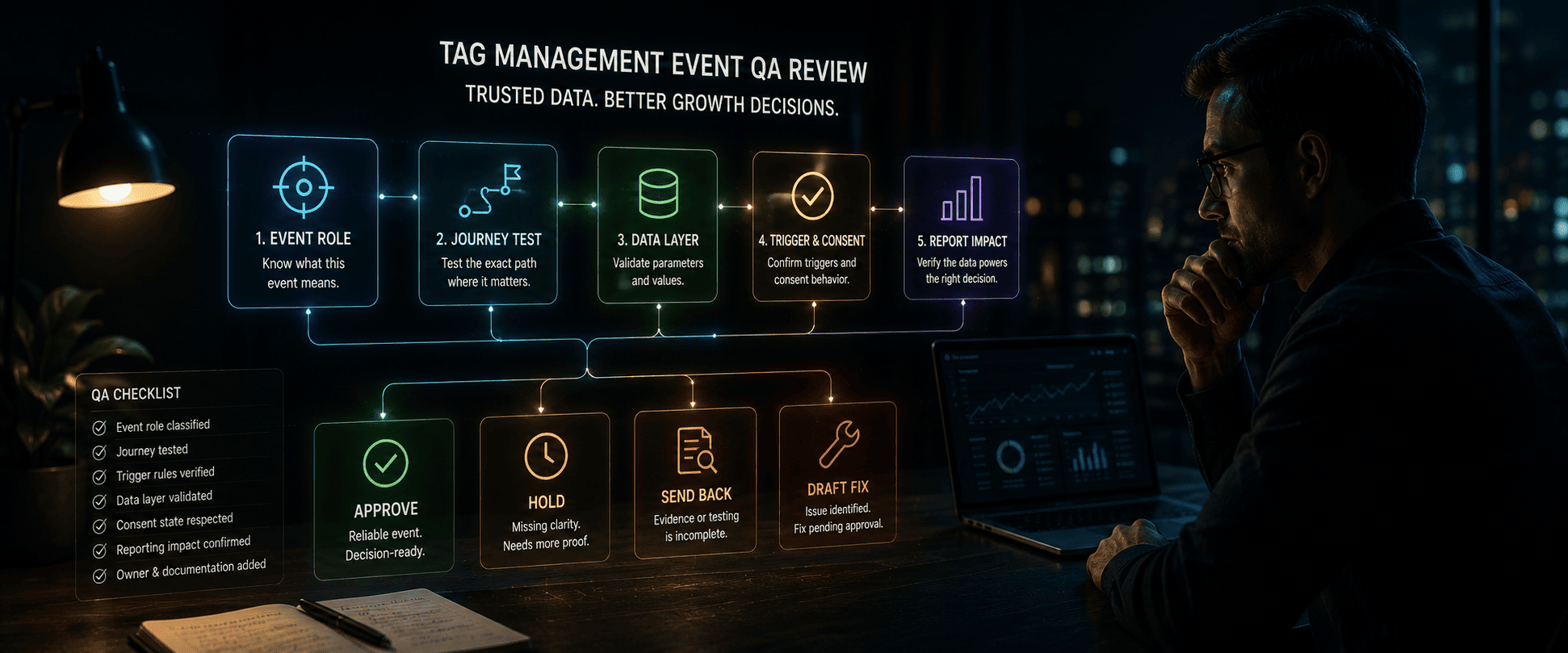
Tag Management Event QA Review
Event movement in analytics can look convincing before it is actually reliable. A click event may increase, scroll tracking may show stronger engagement, video views may rise, or ecommerce events may appear in a campaign report. But before those signals support a growth recommendation, the team needs to confirm that the events fired in the right journey, carried the right parameters, respected consent state, and matched the business decision being made.
The Tag Management Event QA Review helps SEO, analytics, and growth teams decide whether tracked engagement, conversion, and ecommerce events are reliable enough to use in a recommendation before interpreting performance movement. The review connects event role, trigger proof, data layer coverage, debug evidence, journey testing, conversion configuration, and affected reporting before page, link, indexation, campaign, or reporting decisions move forward.
If event quality is uncertain, the recommendation should stay caveated. The event may still be documented, but it should not be used as decision-ready evidence until the measurement owner accepts the caveat or approves a fix.
What This Workflow Decides
The workflow answers one practical question: can this tag-managed event support the recommendation being requested? A useful QA review does not only ask whether the event fired. It asks what the event means, where it fired, what values it sent, and whether those values support the exact decision.
- Approve: The event role, trigger proof, parameters, journey test, affected report, and owner are visible.
- Hold: Event role, trigger behavior, data layer values, consent state, or reporting impact is unclear.
- Send back for evidence: The team needs debug proof, journey test notes, parameter checks, or report validation.
- Draft fix: The event issue is clear, but tag, report, page, or campaign changes remain approval-gated.
Classify The Event Role First
Before using an event in a recommendation, the reviewer should classify its business role. Not every event has the same decision weight. A purchase, qualified lead, or checkout completion is different from a scroll, button click, or video engagement event.
This prevents engagement evidence from being treated like conversion evidence. If a scroll or click event is used to support a revenue or SEO decision, the caveat should remain visible until stronger downstream evidence is reviewed.
- Primary conversion: A decision-driving event tied to business value or qualified outcome.
- Diagnostic signal: An event that helps explain behavior but should not carry the recommendation alone.
- Context-only signal: An event that adds background but should not affect approval or budget movement.
- Noisy event: A duplicate, unstable, unclear, or low-intent event that should stay out of recommendations.
Test The Exact Journey
Journey-specific QA prevents teams from trusting an event just because it fired somewhere. A tag may work on one page but fail on the page, route, consent state, or ecommerce step that produced the report movement. Modern tag behavior can depend on dynamic components, single-page-app routing, page state, data layer timing, and consent settings.
If the affected journey was not tested, the follow-up should stay held. A nearby page or simplified test path is not enough when the recommendation depends on a specific report movement.
- Test the exact page or funnel path tied to the recommendation.
- Confirm the event fires once at the intended moment.
- Check whether consent state changes event behavior.
- Validate single-page-app route changes or dynamic page loads.
- Document debug evidence from the tested journey.
Validate Trigger Rules And Data Layer Coverage
Trigger rules decide when an event fires. The data layer decides what the event says. Both must be reviewed before the event can support a decision. An event can fire correctly while sending stale values, missing parameters, wrong scope, or inconsistent names.
If required parameters are missing or the data layer may be stale, the event should remain caveated. A technically firing tag is not enough if the report needs values that are incomplete or incorrect.
- Required parameters arrive with stable names.
- Values are current and match the page or ecommerce state.
- Event scope is correct for user, session, item, page, or transaction reporting.
- Data layer values are not stale from a prior state.
- Trigger rules do not create duplicate or premature events.
Separate Engagement From Conversion Evidence
Engagement events can help explain behavior, but they should not automatically drive stronger recommendations. A video view, scroll milestone, or click may show interest, but it does not prove qualified conversion, revenue, or buyer readiness.
This is especially important when analytics movement influences SEO or campaign recommendations. The event must match the decision it is being used to support.
- Use click, scroll, and video events as diagnostic context.
- Use ecommerce, lead, purchase, or qualified conversion events for stronger decisions.
- Check whether engagement movement connects to downstream conversion behavior.
- Keep recommendations caveated when the event does not match the business decision.
- Do not let weak event quality drive page, link, or indexation changes.
Review Conversion Configuration And Affected Reports
The QA review should inspect how the event appears in reporting and whether it is marked as a conversion. A helper event or low-intent interaction can create reporting noise if it is treated as a primary outcome. The affected report should show whether the event is used in performance analysis, attribution, optimization, or decision memos.
If a proposed fix changes reports, campaigns, page behavior, or account configuration, it should stay approval-gated.
- Which report uses the event?
- Is the event marked as a conversion or only diagnostic?
- Does the conversion configuration match the measurement plan?
- Would changing the event affect historic comparisons?
- Who owns the reporting impact?
Turn QA Into A Scoped Next Step
The review should end with a reliable label, caveated recommendation, or scoped event fix. A reliable label says the event is ready for the intended decision. A caveated recommendation explains what the signal can and cannot support. A scoped fix names the exact tag, trigger, parameter, data layer, report, or approval issue to resolve.
- Event role and business meaning
- Journey tested and debug evidence
- Required parameters and caveats
- Affected report or recommendation
- Owner and approval state
Final Approval Rule
A Tag Management Event QA Review should approve event use only when the business role, journey trigger proof, data layer values, required parameters, conversion configuration, affected report, owner, and caveat are visible.
10X can draft the review note and event fix, but tracking, report, page, or campaign changes should not publish automatically. The measurement owner must approve the next action because a tracking fix can change downstream reporting, attribution, optimization rules, and historic comparisons.
Sample review note
10X should review Tag Management Event QA Review, compare the decision evidence with the caveats, and keep the next recommendation approval-gated until the reviewer accepts it.